
WPSubscription Pro adds a Subscription section to WP Fusion's product settings, so you can map each subscription status to a set of CRM tags. When a customer's subscription enters that status, WP Fusion applies the tags to their contact record — and, if you ask it to, removes the ones that no longer apply.
Prerequisites
WooCommerce, active.
WPSubscription (the free plugin), active.
WPSubscription Pro, active. The WP Fusion integration ships in Pro.
WP Fusion, active and already connected to your CRM. The free WP Fusion Lite does not include the WooCommerce product panel this integration extends.
Note: Tags are configured per product, not globally. Two subscription products can drive two completely different sets of tags.
Step 1 — Open the product's WP Fusion settings
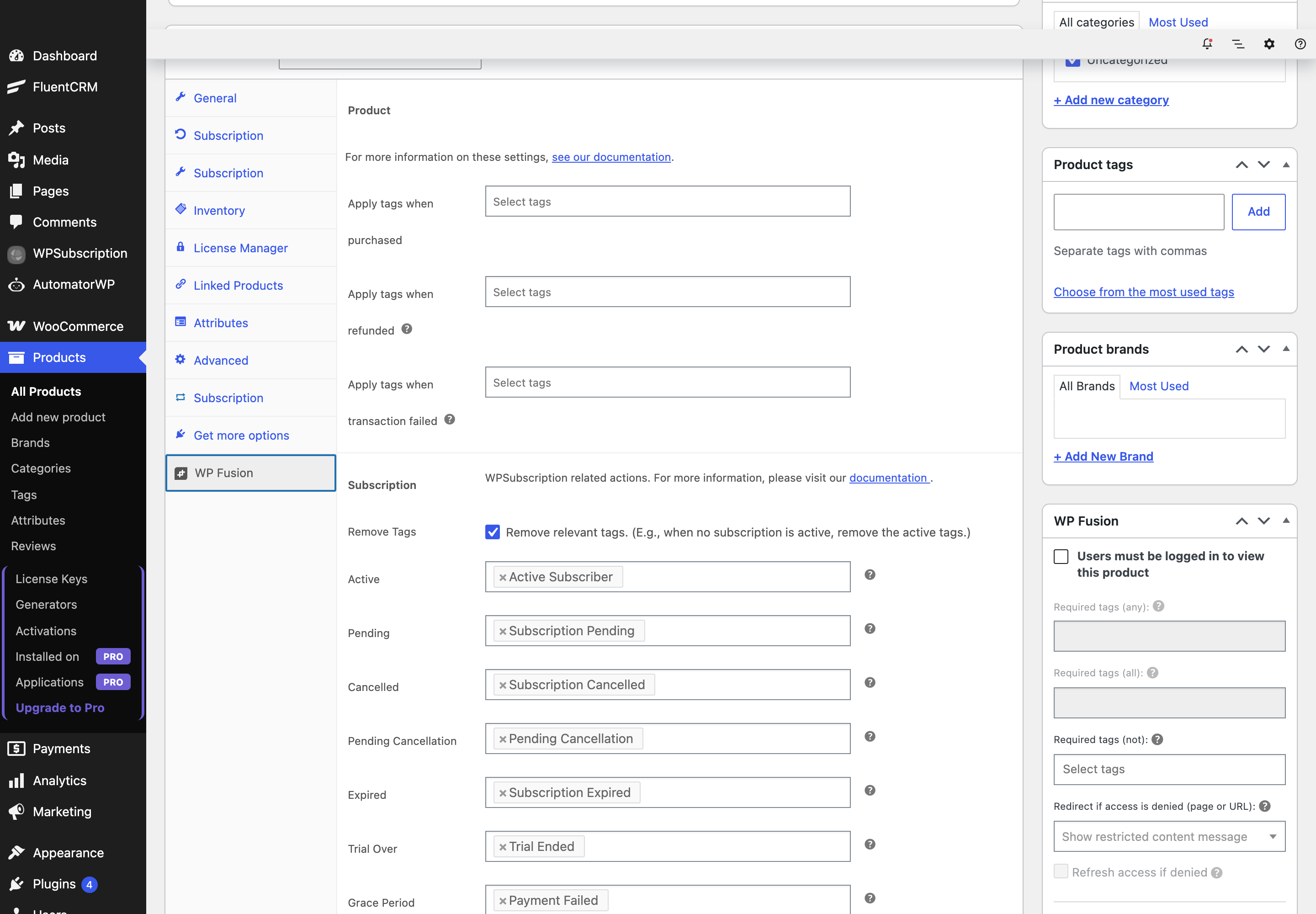
Go to Products, edit a subscription product, and open the WP Fusion tab in the Product data panel. With WPSubscription Pro active, a Subscription section appears there.
Step 2 — Map tags to statuses
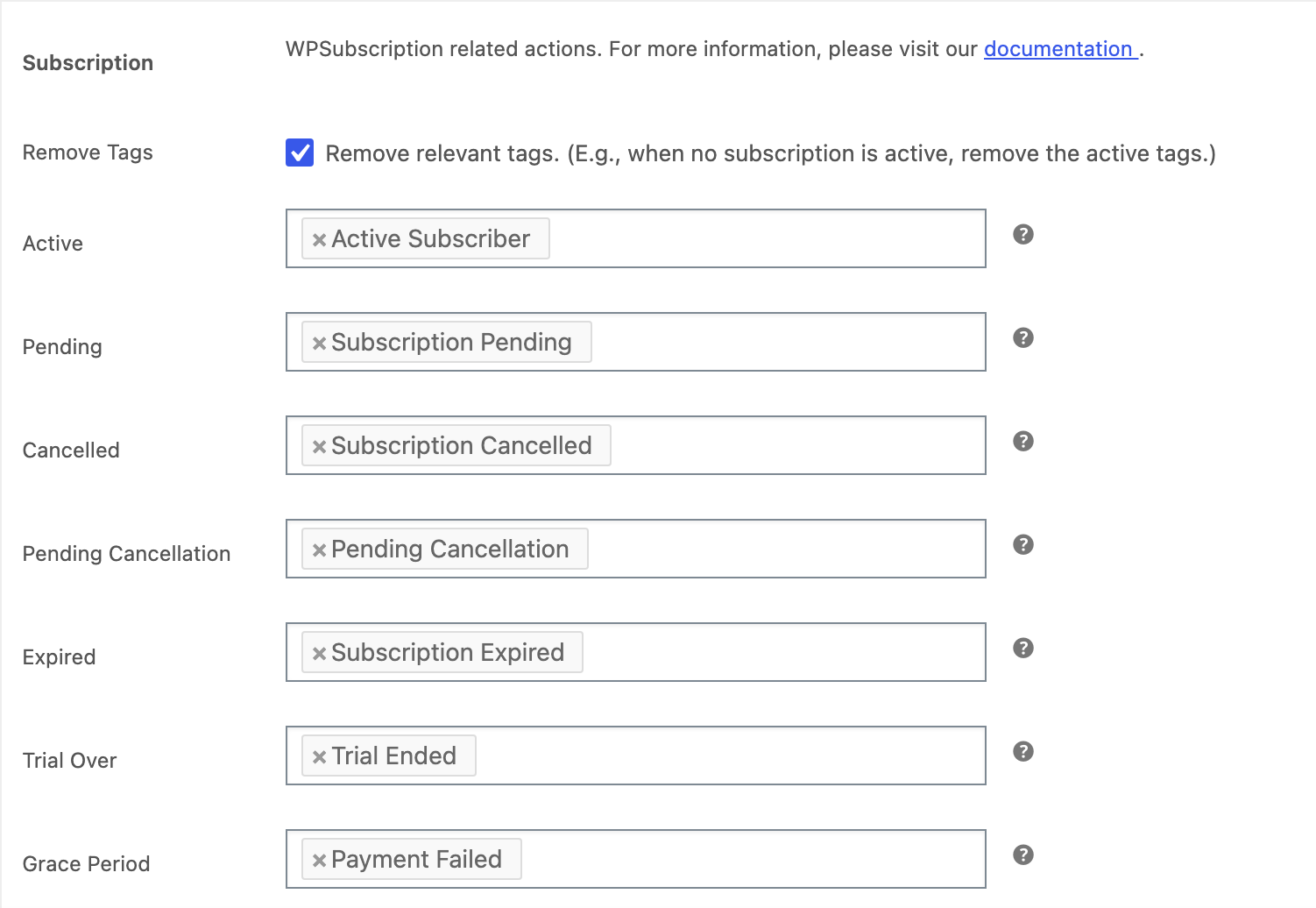
There are seven tag fields, one per subscription status. Each takes any number of tags from your CRM. Leave a field empty and nothing happens for that status.
Field | Tags are applied when |
|---|---|
Active | The subscription becomes active — the first payment, and every successful renewal. |
Pending | The subscription is created but payment has not completed. |
Cancelled | The subscription is cancelled outright. |
Pending Cancellation | The customer has cancelled, but the period they already paid for is still running. |
Expired | The subscription reached the end of its term without renewing. |
Trial Over | A free trial ended. |
Grace Period | A renewal payment failed and the grace period started. |
Step 3 — Decide whether tags should be removed
Above the tag fields is a single checkbox, Remove Tags, described as “Remove relevant tags. (E.g., when no subscription is active, remove the active tags.)”
Leave it off and tags only ever accumulate: a customer who subscribes, cancels and subscribes again ends up carrying the Active, Cancelled and Active tags all at once. Switch it on and WPSubscription tidies up after each status change.
What “tidy up” means precisely is worth understanding, because it is not simply “remove the tags for the old status”:
After every status change, WPSubscription looks at all of that customer's subscriptions, not just the one that changed.
For each of Active, Pending, Cancelled, Pending Cancellation and Expired, if the customer now has no subscription in that state, those tags are removed.
Trial Over and Grace Period tags are never removed automatically. Those two are records of something that happened, not states a customer is in, so remove them yourself if your CRM workflow needs that.
A tag that is being applied is never also removed in the same pass. If the same tag appears in two fields, applying wins.
Why this matters: a customer with two subscriptions to the same product keeps the Active tag when one of them is cancelled, because the other is still active. That is the behaviour you want for access control, and it is the reason removal is evaluated across the whole account rather than per subscription.
Step 4 — Save and test
Click Update on the product. The mapping takes effect immediately — there is nothing to sync or rebuild.
To confirm it works, place a test order for the subscription product and complete payment, then open the customer's user profile and check the WP Fusion panel. The Active tags should be on the contact, and WP Fusion's own logs will show the API call to your CRM.
Testing renewals: renewals, trial endings and grace periods run on WP-Cron. They will not fire while you watch the screen — the scheduled event has to run before the corresponding tags are applied.
Troubleshooting
Symptom | Cause |
|---|---|
No Subscription section in the WP Fusion tab | WPSubscription Pro is not active, or WP Fusion is not fully loaded. The integration only registers itself once WP Fusion's own integration base class exists. |
Tags never apply | The tags are read from the product the subscription is for. Check that you configured the right product, and that the customer's subscription actually reached that status. |
Old tags never go away | Remove Tags is off, or the customer still has another subscription in that state. |
Guest checkout orders get no tags | Tags attach to a user account. A subscription with no user behind it has nothing to tag. |
Once the mapping is saved, every status change on that product keeps the customer's CRM record in step on its own.